Use your personal and work mailboxes with Claude or ChatGPT
Gmail at home, Outlook or a company domain at work: connect each one to MailMCP, add one connector per mailbox in your AI, and tell it which mailbox to use.
Screenshots taken on October 18, 2026 with a demo account.
Short answer: in MailMCP, each mailbox has its own server URL, so you add one connector per mailbox in Claude or ChatGPT (for example "MailMCP Work" and "MailMCP Personal") and name the mailbox in your request. The free Claude plan allows only one custom connector; paid Claude plans allow several. Native connectors are narrower: Claude connects a single Google account, and ChatGPT accepts several Gmail accounts since late August 2026 but not a second Outlook account.
What you need
- A MailMCP account. The free plan connects one mailbox; to add more, upgrade one mailbox to Pro, then each extra mailbox can stay Free or go Pro.
- Each mailbox connected to MailMCP: Gmail with an app password, Outlook and Hotmail with "Sign in with Microsoft", any other IMAP/SMTP mailbox with its password.
- Claude (a paid plan for several connectors) or ChatGPT with Developer mode.
Several mailboxes: what each connector allows (October 2026)
| MailMCP | Claude | ChatGPT | |
|---|---|---|---|
| Two Gmail accounts | YES One connector per mailbox | NO One Google account | YES Since late August 2026 |
| Personal and work Outlook | YES Outlook.com, Hotmail and Microsoft 365 | NO Work or school Microsoft 365 account only | NO One Outlook account, personal ones refused |
| Gmail, Outlook and another provider together | YES Any IMAP/SMTP mailbox | Gmail and Microsoft 365 only | Gmail and Outlook only |
| Same mailboxes in other AI tools | YES Claude, ChatGPT, Cursor, n8n… | NO | NO |
Sources: MailMCP tests (October 2026), Claude Help Center, OpenAI release notes (June and August 2026).
Step by step
-
Connect each mailbox to MailMCP
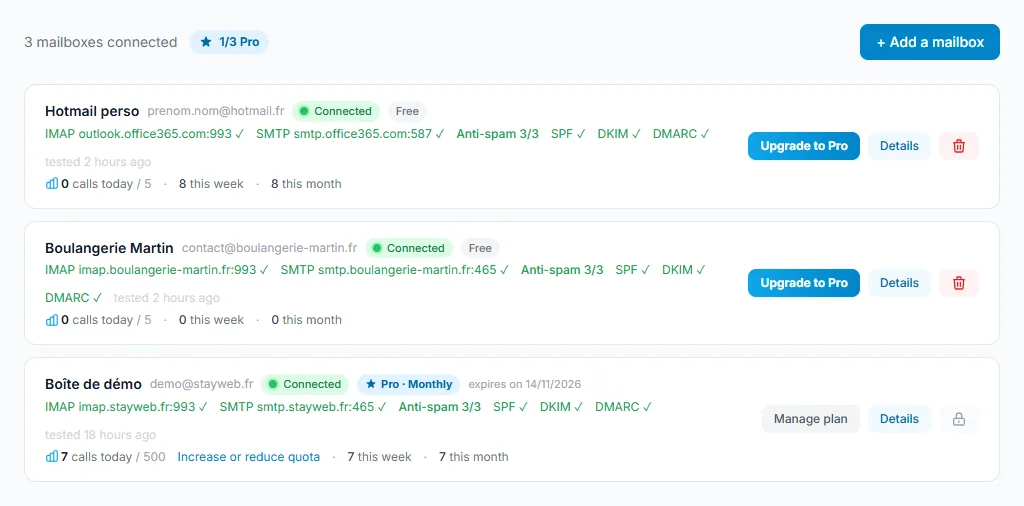
In Email accounts, click "Add a mailbox" for each address: your personal Gmail, your work Outlook, your company domain. On a free account, the second mailbox asks you to upgrade one mailbox to Pro first: that is normal. Each mailbox then has its own plan, Free (5 calls a day) or Pro (500 a day).
Tap the screenshot to enlarge it. -
Copy the server URL of each mailbox
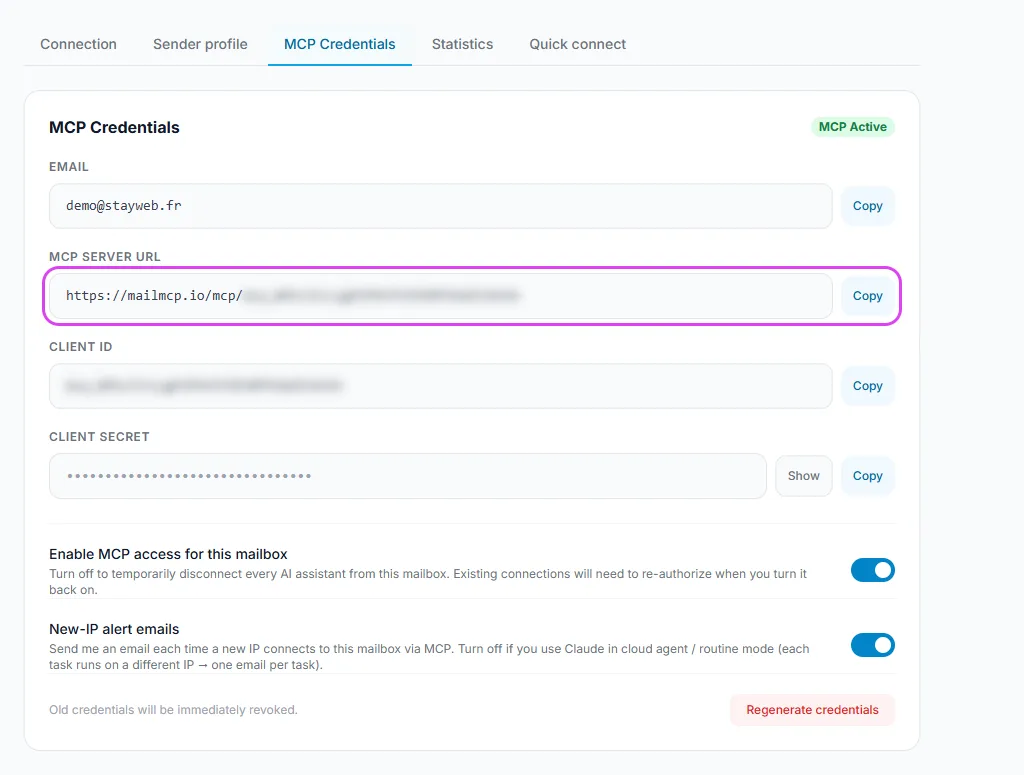
Open Details on a mailbox, MCP Credentials tab: the server URL ends with the Client ID of that mailbox. One URL opens one mailbox, never the others. Repeat for each mailbox.
Tap the screenshot to enlarge it. -
Add one connector per mailbox, with a clear name
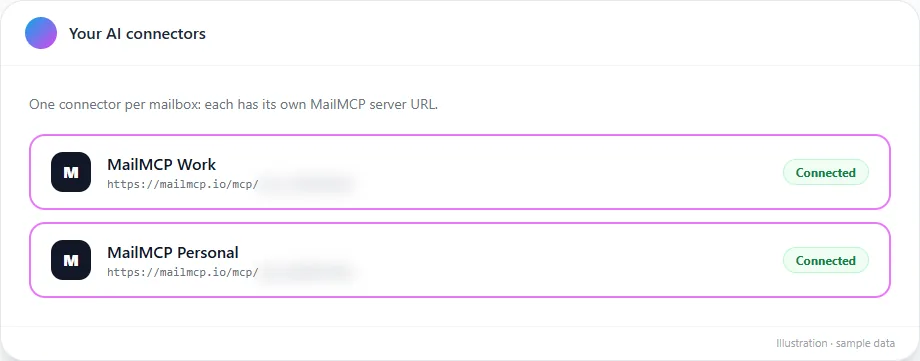
In Claude: Customize → Connectors → "Add custom connector", once per URL. In ChatGPT: Developer mode, then "Create an MCP app" for each URL. Give each one a name the AI can tell apart, such as "MailMCP Work" and "MailMCP Personal". On the MailMCP authorisation page, check that the mailbox shown is the right one.
Free Claude plan: one custom connector only. If "Add custom connector" is greyed out, a connector is already added: use a paid Claude plan, or ChatGPT, for the second mailbox.
Tap the screenshot to enlarge it. -
Tell the AI which mailbox to use
Name the connector or the address in your request. The AI can also work across both: search the two mailboxes, or read in one and send from the other.
"With MailMCP Work, summarise my unread emails from today. Then with MailMCP Personal, tell me if the electricity bill has arrived."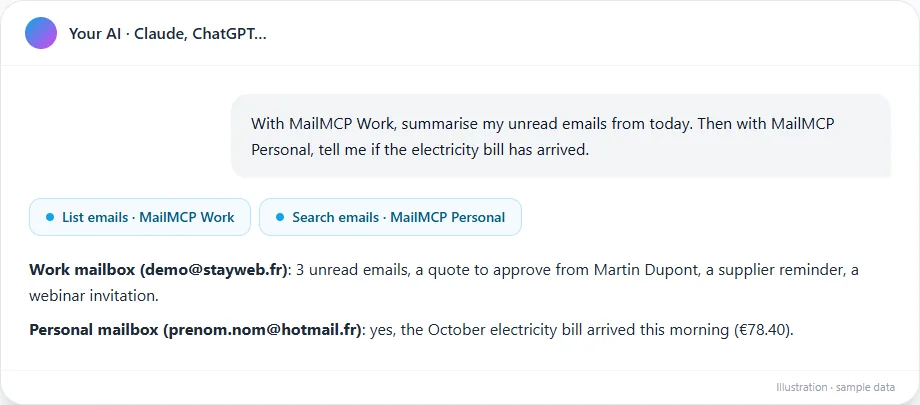
Tap the screenshot to enlarge it. -
Set a default so you do not repeat it
Write the rule once in your custom instructions, or in the instructions of a Claude project: "Work emails: MailMCP Work. Personal emails: MailMCP Personal. Always ask before sending." The AI then picks the right mailbox on its own.
-
Check which mailbox did what
MCP logs list every action with the mailbox, the tool, the date and the IP. Filter by mailbox to check that a reply really left from the right address.
If it does not work
Can one connector access all my mailboxes?
No. A MailMCP URL opens a single mailbox, by design: a leaked URL or token never exposes your other mailboxes. Add one connector per mailbox. If MailMCP shows "Choose a mailbox" while you authorise, pick the one that matches this connector.
Can I connect two Gmail accounts to Claude?
Not with the Gmail connector of Claude, which takes a single Google account. With MailMCP, connect each Gmail address with its app password and add one connector per address.
"Add custom connector" is greyed out in Claude
The free Claude plan allows one custom connector and one is already added. Remove it, upgrade your Claude plan, or connect the second mailbox to ChatGPT.
MailMCP asks me to upgrade before adding a second mailbox
That is normal: a free account connects one mailbox. Upgrade one mailbox to Pro (€7.99 a month, less with a 12- or 24-month commitment); after that you can add as many mailboxes as you need, and each extra one can stay Free.
The AI used the wrong mailbox
Name the connector in the request ("with MailMCP Personal"), give the connectors clearly different names, and keep approval on for sending: the approval request shows which connector is used.
Other illustrated guides
Still stuck? A real person answers.
Tell us what you see on screen and we will look at your case — support is handled by the people who build MailMCP.
Contact support