Which email provider works best with MCP?
Gmail, Outlook, Yahoo, iCloud, OVH, IONOS, o2switch, Infomaniak, LWS, Orange, Free or your own mail server: here is how each one connects to MailMCP, and the only one that does not.
Screenshots taken on October 18, 2026 with a demo account.
Short answer: the best email provider for MCP is usually the one you already have, because MailMCP connects any mailbox that offers IMAP and SMTP. Hosts such as OVH, IONOS, o2switch, Infomaniak or LWS take your usual mailbox password. Gmail, Yahoo and iCloud need an app password. Outlook, Hotmail and Microsoft 365 connect with "Sign in with Microsoft". Proton Mail is the exception: it is not supported.
What you need
- Your email address and, depending on the provider, its password, an app password or your Microsoft account.
- IMAP access turned on at your provider: it is on by default at most hosts, but Free, Orange and GMX ask you to switch it on in their settings.
- A free MailMCP account: 1 mailbox and 5 actions a day to test.
Email providers and MCP: how each one connects (October 2026)
| How it connects to MailMCP | Status | |
|---|---|---|
| Gmail, Google Workspace | App password (2-Step Verification on) | YES Recognised automatically |
| Outlook.com, Hotmail, Live | "Sign in with Microsoft", no password | YES Recognised automatically |
| Microsoft 365 | "Sign in with Microsoft", no password | YES Recognised from the mail servers of the domain |
| Yahoo Mail | App password | YES Recognised automatically |
| iCloud Mail | App-specific password (two-factor authentication on) | YES Recognised automatically |
| GMX | Mailbox password, IMAP switched on in the GMX settings | YES Recognised automatically |
| OVHcloud | Mailbox password (Exchange: the server shown in your OVH panel) | YES Recognised automatically |
| LWS | Mailbox password | YES Recognised automatically |
| Infomaniak | Mailbox password, server mail.infomaniak.com | YES Servers to enter |
| IONOS | Mailbox password | YES Servers to enter |
| o2switch | Mailbox password | YES Servers to enter |
| Orange, Wanadoo | Mailbox password, servers imap.orange.fr and smtp.orange.fr | YES Servers to enter |
| Free | Mailbox password, IMAP switched on in the Zimbra webmail | YES Servers to enter |
| SFR | Mailbox password (standard IMAP and SMTP) | YES Servers to enter |
| Your own server (Zimbra, cPanel, Plesk…) | Mailbox password, servers given by your host | YES Servers to enter |
| Proton Mail | IMAP only through Proton Mail Bridge, on your own computer | NO Not supported |
Sources: the MailMCP connection wizard and our tests (October 2026), help pages of each provider. Proton Mail checked on October 18, 2026.
Step by step
-
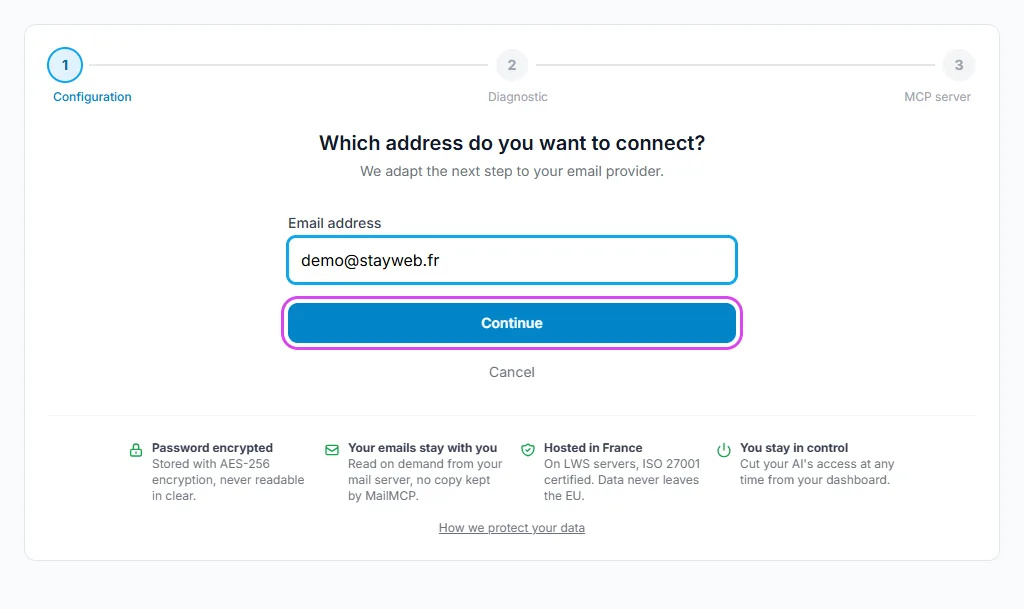
Type your email address
In your dashboard, open Email accounts, click "+ Add a mailbox" and type only your address. MailMCP looks at the domain and its mail servers to recognise the provider, including a company domain hosted on Microsoft 365 or Google Workspace.
Tap the screenshot to enlarge it. -
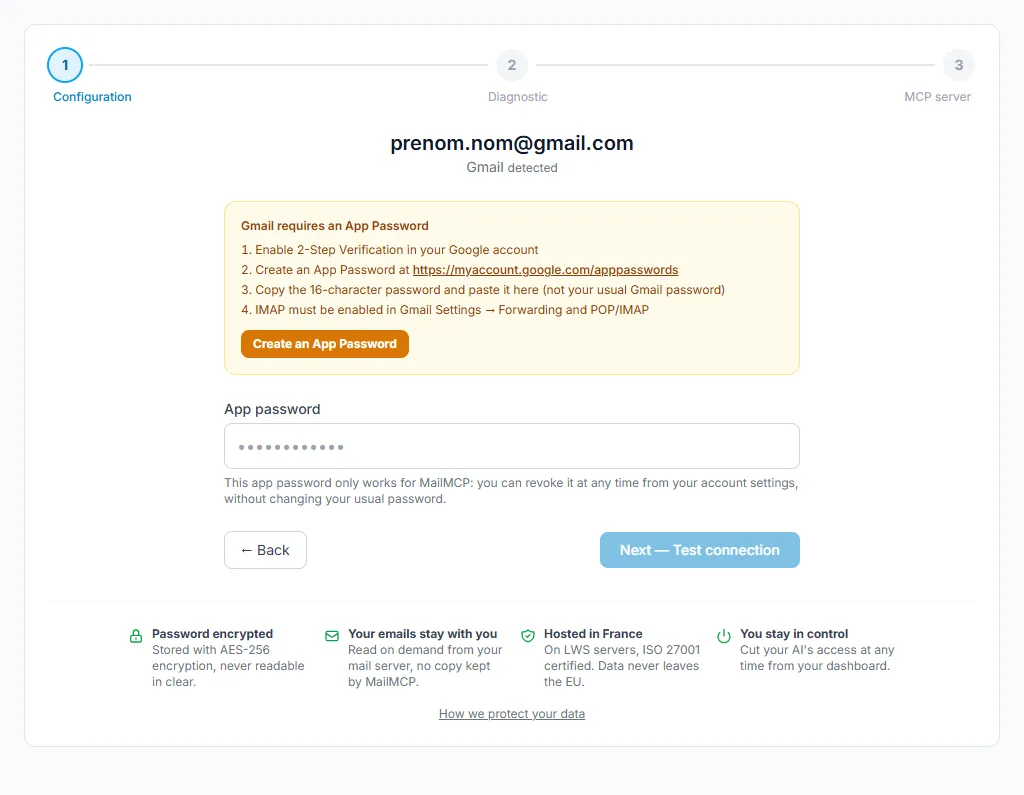
Gmail, Yahoo, iCloud: create an app password
These three refuse your usual password for IMAP. Turn on two-step verification, create an app password in the security settings of your account, then paste the generated code into MailMCP. The wizard shows the link to the right page.
Tap the screenshot to enlarge it. -
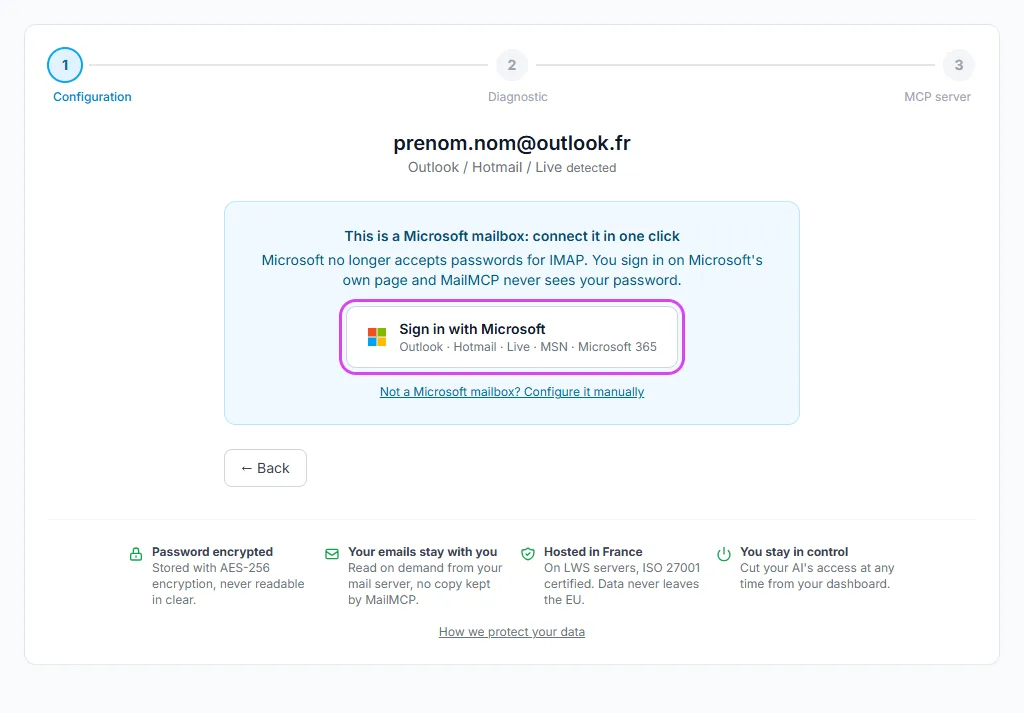
Outlook, Hotmail, Microsoft 365: sign in with Microsoft
Microsoft has switched off password sign-in for IMAP and SMTP. MailMCP shows a "Sign in with Microsoft" button instead: you sign in on the Microsoft page and approve access, and MailMCP never sees your password.
Tap the screenshot to enlarge it. -
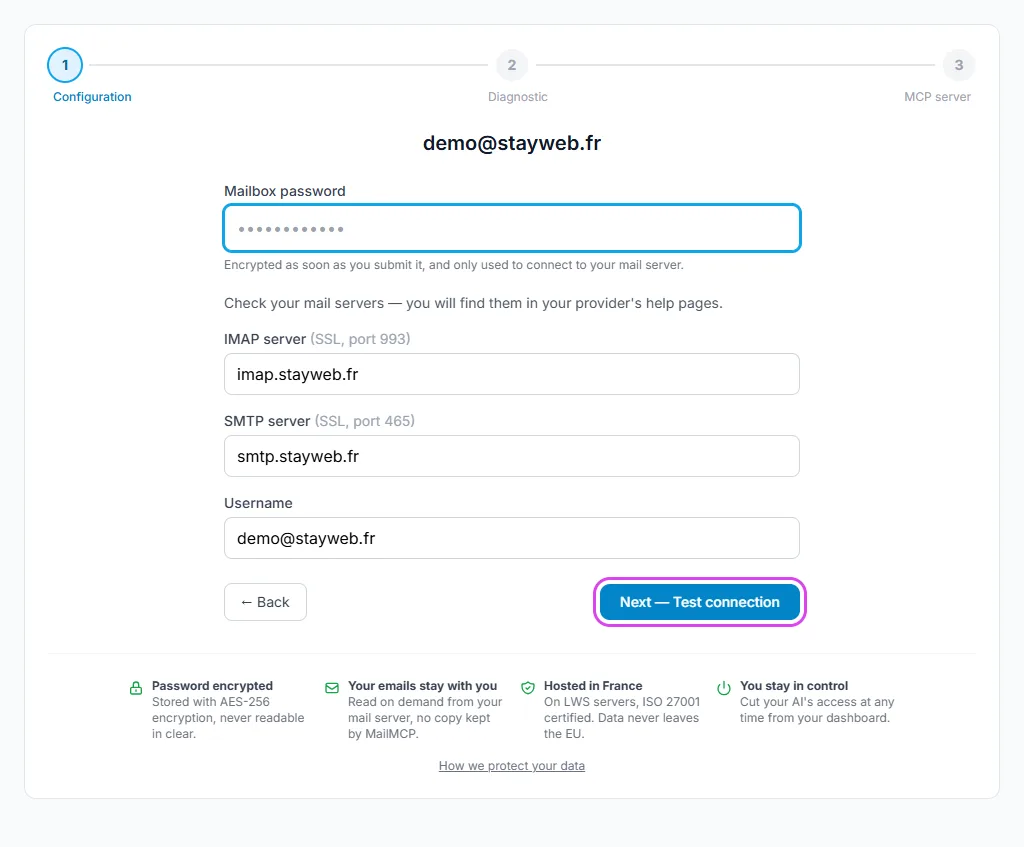
Any other host: your mailbox password
For OVH, LWS and GMX, the servers are filled in for you. For Infomaniak, IONOS, o2switch, Orange, Free, SFR or your own server, enter the IMAP and SMTP servers given by your host, your full address as username, and your usual mailbox password.
Free, Orange and GMX: turn IMAP access on in your webmail settings first, otherwise the connection test fails.
Tap the screenshot to enlarge it. -
Test the connection and copy your MCP URL
Click "Next — Test connection": MailMCP checks IMAP and SMTP with your provider. Once the mailbox is validated, its MCP server URL is ready to paste into Claude, ChatGPT, Cursor or another AI.
If it does not work
Which provider is the easiest to connect?
Hosts that accept your mailbox password (OVH, LWS, Infomaniak, IONOS, o2switch…) take a single step. Gmail, Yahoo and iCloud add an app password to create, and Microsoft a sign-in page. Each one takes a few minutes.
Why is Proton Mail not supported?
Proton only offers IMAP through Proton Mail Bridge, an app that runs on your own computer and requires a paid Proton plan: a cloud service like MailMCP cannot reach it. Forward your Proton emails to another mailbox and connect that one instead.
"Authentication refused" during the test
The password is wrong or your provider requires an app password (Gmail, Yahoo, iCloud). For Outlook and Microsoft 365, use "Sign in with Microsoft": no password works anymore.
My provider is not in the list
It works as long as it offers IMAP and SMTP: if your mailbox works in Thunderbird with a password, it works with MailMCP. Ask your host for the server names.
OVH Exchange fails with error 535
OVH Exchange uses other servers than MX Plan. Replace them with the one shown in your OVH Exchange panel, such as ex5.mail.ovh.net.
Step-by-step guide for your provider
Still stuck? A real person answers.
Tell us what you see on screen and we will look at your case — support is handled by the people who build MailMCP.
Contact support