Which AI assistants can manage your emails through MCP?
Claude, ChatGPT, Cursor, VS Code, Windsurf, n8n, Make, LibreChat and more: here is every AI we have documented with MailMCP, how you add it, and what it takes.
Screenshots taken on October 18, 2026 with a demo account.
Short answer: any AI client that supports remote MCP servers over HTTP, with OAuth or a Bearer token, can manage your emails through MailMCP. That includes Claude (web, desktop and Claude Code), ChatGPT in Developer mode, Cursor, VS Code with GitHub Copilot, Windsurf, Cline, n8n, Make, LibreChat and OpenClaw. You paste the same MailMCP server URL into each of them: one connection to your mailbox, every AI you use.
What you need
- A MailMCP account with a mailbox connected: the free plan (1 mailbox, 5 actions a day) is enough to test.
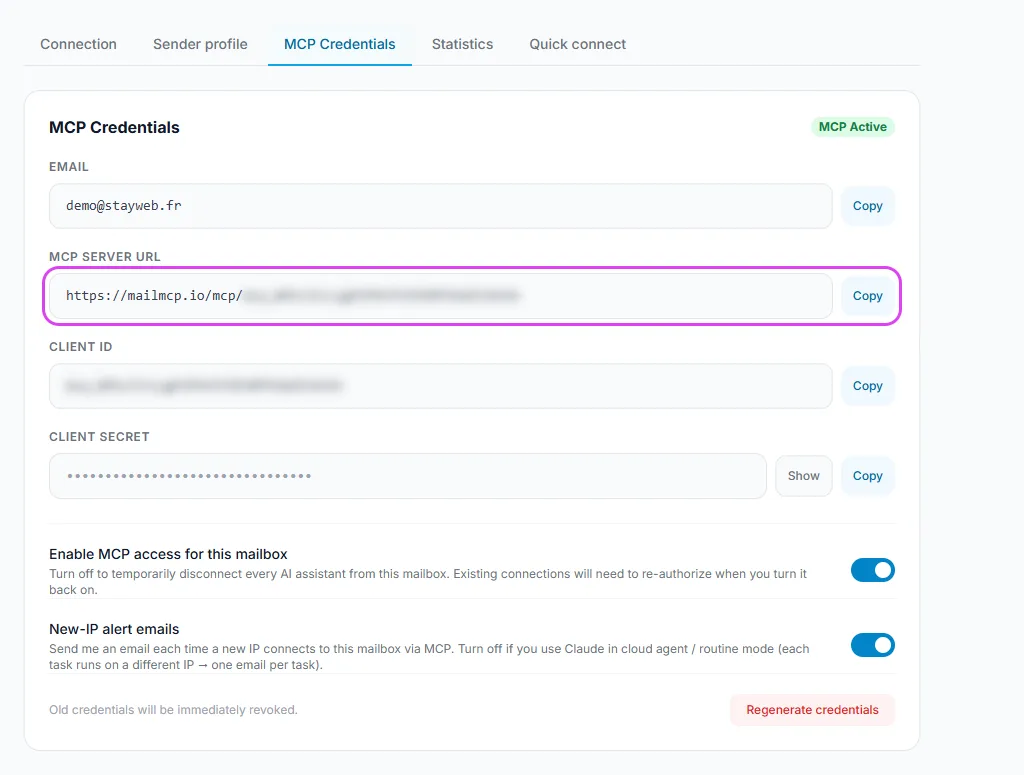
- The MCP server URL of that mailbox, shown in your dashboard under MCP credentials.
- An AI client from the table below. Claude and ChatGPT sign in by OAuth; the other clients also take the Client Secret as a Bearer token.
AI assistants that work with MailMCP (October 2026)
| How you add MailMCP | What it takes | |
|---|---|---|
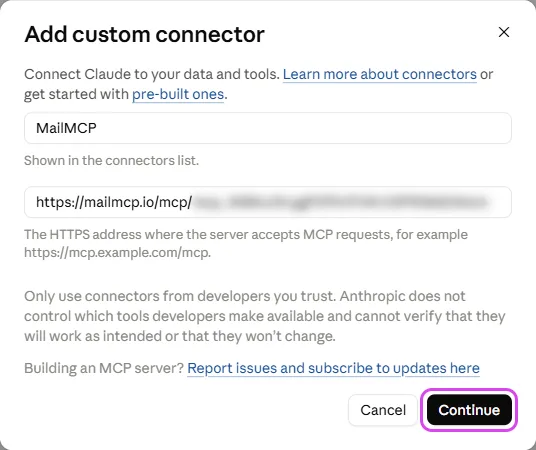
| Claude.ai | Customize → Connectors → "Add custom connector", paste the URL, sign in by OAuth | Free plan: 1 custom connector. Paid plans: several |
| Claude Desktop | Settings → Developer → Edit Config, then the mailmcp block in claude_desktop_config.json | The desktop app, on macOS or Windows |
| Claude Code | mcpServers block in .claude/settings.json, check with /mcp | Claude Code on macOS, Windows or Linux |
| ChatGPT | Developer mode on, then Plugins → "+" → "Create an MCP app", paste the URL, sign in by OAuth | Developer mode, available on the free plan too |
| Cursor | .cursor/mcp.json in the project, or ~/.cursor/mcp.json for all projects | The Agent mode of the chat |
| VS Code | An MCP server entry in the user settings (JSON) | GitHub Copilot in Agent mode |
| Windsurf | Cascade → MCP Servers → Configure (mcp_config.json) | Cascade, the Windsurf assistant |
| Cline | Cline panel → MCP Servers → "Add MCP Server" | The Cline extension in VS Code |
| n8n | An "MCP Client Tool" node linked to an AI Agent node | An AI Agent node with a model (Claude, GPT…) |
| Make | An HTTP module that sends JSON-RPC requests to the URL | A scenario with an HTTP module |
| LibreChat | A mailmcp entry in librechat.yaml, then a restart | A self-hosted LibreChat instance |
| OpenClaw | The MCP servers section of its JSON configuration file | OpenClaw installed on your computer |
Sources: MailMCP setup guides and tests (October 2026), checked on the free Claude and ChatGPT plans. Each client is detailed in our documentation, linked at the bottom of this page.
Step by step
-
Choose the AI you already use
Every client in the table gets the same email tools from MailMCP: read, search, send, reply, schedule, move, flag. Pick the one you work in all day: Claude or ChatGPT for conversations, Cursor, VS Code or Windsurf while you code, n8n or Make for automations that run without you.
You can connect several AIs to the same mailbox: they share its daily quota, and each action is logged with the IP it came from.
-
Copy the MCP server URL of your mailbox
In your dashboard, open Email accounts, then the MCP credentials tab of the mailbox, and copy the MCP server URL. Each mailbox has its own URL: connect two mailboxes, you get two URLs.
Tap the screenshot to enlarge it. -
Claude and ChatGPT: add it as a custom connector
Claude and ChatGPT take the URL as a custom connector and sign in by OAuth: you approve access on a MailMCP page, with no secret to paste. In ChatGPT, turn Developer mode on first, otherwise the field for the URL does not appear.
Tap the screenshot to enlarge it. -
Cursor, VS Code, Windsurf, Claude Desktop: the configuration file
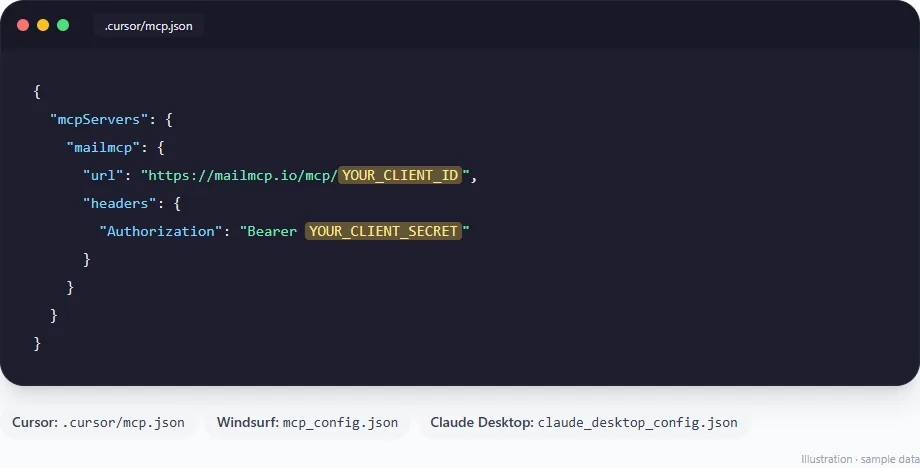
Code editors, Claude Desktop, Claude Code, Cline, LibreChat and OpenClaw read a configuration file. Add a mailmcp entry with the URL, and an Authorization header made of "Bearer" followed by your Client Secret. Only the file changes: .cursor/mcp.json for Cursor, mcp_config.json for Windsurf, claude_desktop_config.json for Claude Desktop. n8n and Make call the same URL from a node or an HTTP module.
Tap the screenshot to enlarge it. -
Run a first test
Name MailMCP in your first request, so the AI does not pick a built-in Gmail or Outlook connector. Claude and ChatGPT ask for your approval before the first action: answer "Always allow" if you do not want to be asked each time.
"Use MailMCP to list my 3 most recent emails."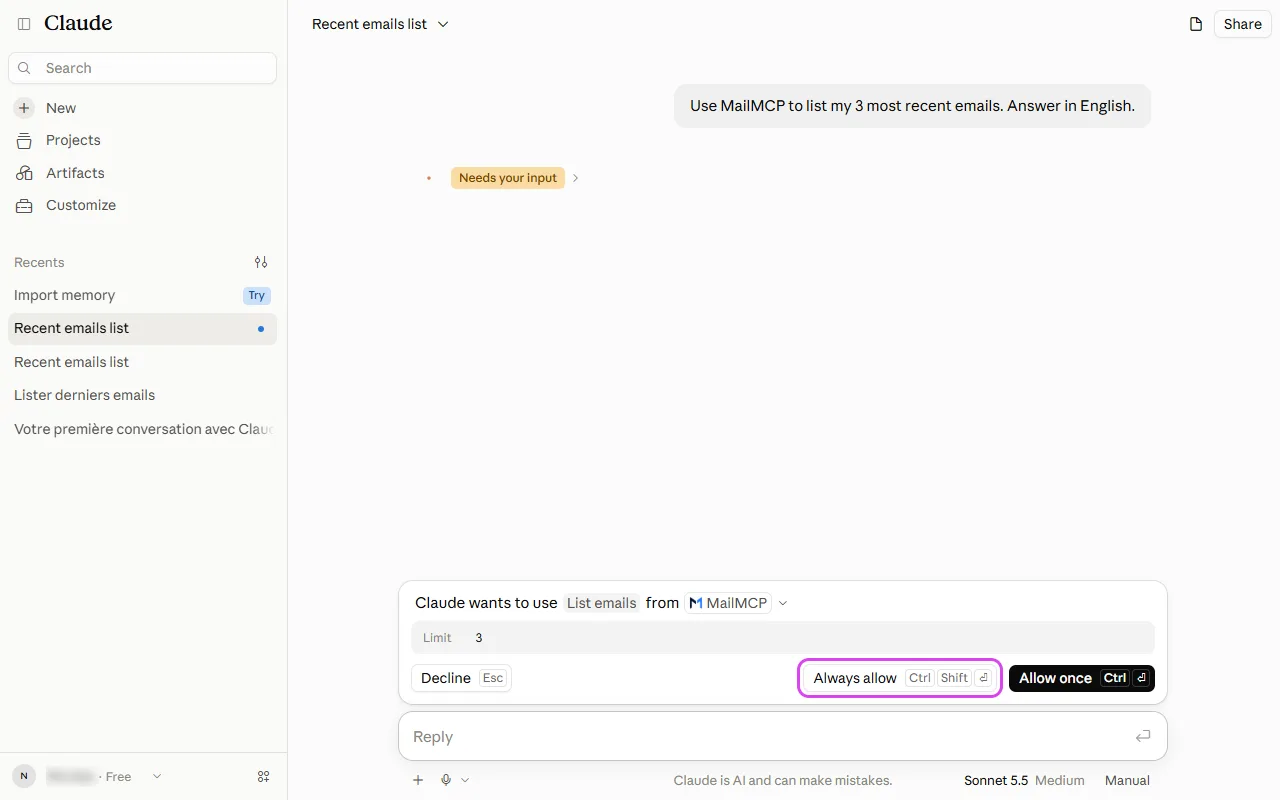
Tap the screenshot to enlarge it. -
Check what each AI did
Every action of every AI is logged in your dashboard, under MCP logs: date, mailbox, tool and IP address, kept for 30 days. You also get an email alert when a new IP connects to the mailbox.
If it does not work
Which MCP server works with Claude Desktop for email?
MailMCP works with Claude Desktop for any IMAP/SMTP mailbox, and for Outlook and Microsoft 365. Add it in claude_desktop_config.json (Settings → Developer → Edit Config), restart Claude Desktop, and the email tools appear. MailMCP is hosted in France: there is nothing to install or run on your computer.
Can Cursor read my Outlook emails?
Yes. Connect your Outlook, Hotmail or Microsoft 365 mailbox to MailMCP with "Sign in with Microsoft", then add the mailbox URL to .cursor/mcp.json. Cursor then reads, searches and sends your Outlook emails from the Agent chat.
My AI is not in the table
If it accepts a remote MCP server over HTTP, with OAuth or a custom Authorization header, it works the same way: paste the URL and, if asked, the Client Secret as a Bearer token. A client that only runs local servers launched on your computer cannot reach MailMCP directly.
Do I need a paid AI plan?
Not for Claude or ChatGPT: the free Claude plan allows one custom connector, and ChatGPT Developer mode is available on the free plan. Code editors and automation tools follow their own plans. MailMCP itself starts free, with 1 mailbox and 5 actions a day.
The AI uses its own Gmail or Outlook connector instead
Name MailMCP in your request ("with MailMCP…"), or turn the built-in connector off for this conversation.
Setup guide for each AI
Still stuck? A real person answers.
Tell us what you see on screen and we will look at your case — support is handled by the people who build MailMCP.
Contact support