Manage your MailMCP Pro plan yourself
Subscribe, change commitment, cancel or get refunded: everything is done from the plan page of each mailbox, without writing to support.
Screenshots taken on October 17, 2026 with a demo account.
Short answer: Pro is billed per mailbox. In Email accounts, click "Upgrade to Pro" on the mailbox (or "Manage plan" if it is already Pro). On that page you choose monthly (€7.99), 12 months (€2.99/month) or 24 months (€1.99/month), switch with "Switch to this plan", cancel with "Cancel subscription" (Pro stays active until the end of the paid period), or, within 7 days of your first payment, click "Cancel and get refunded".
What you need
- A verified email address: the Subscribe button only appears once your address is confirmed.
- A bank card. Payment is handled by Polar, our billing partner, which issues the VAT invoice.
Step by step
-
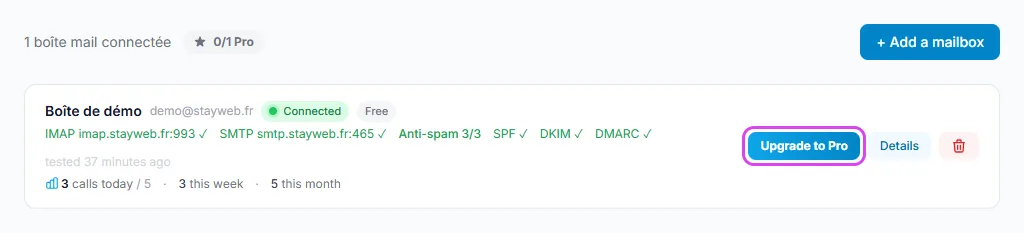
Email accounts → "Upgrade to Pro" on the mailbox
Pro is per mailbox: click "Upgrade to Pro" on the mailbox you want to upgrade. On a mailbox that is already Pro, the button is called "Manage plan".
Tap the screenshot to enlarge it. -
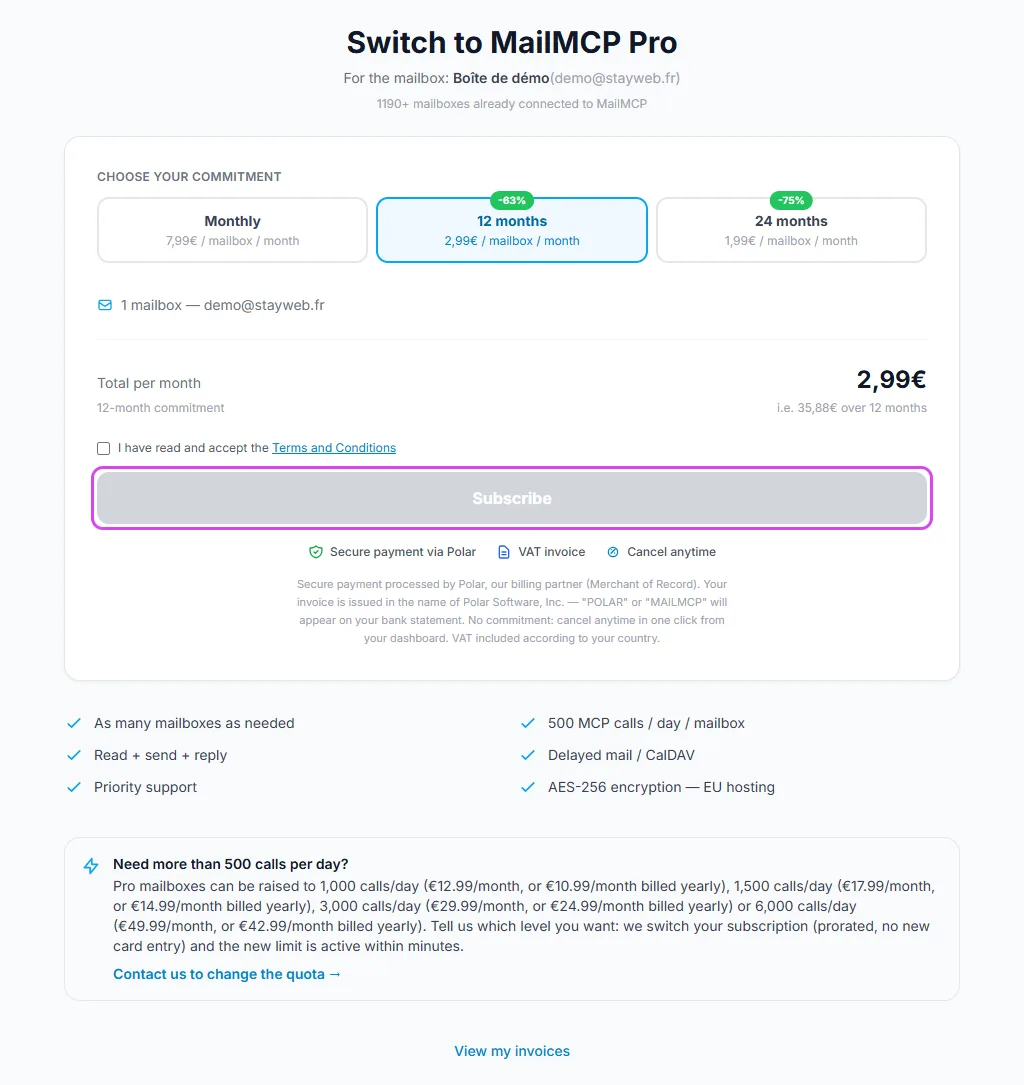
Choose your commitment and subscribe
Pick monthly, 12 months or 24 months, tick "I have read and accept the Terms and Conditions" and click Subscribe. You pay on Polar's secure page; Pro is active as soon as the payment goes through.
Tap the screenshot to enlarge it. -
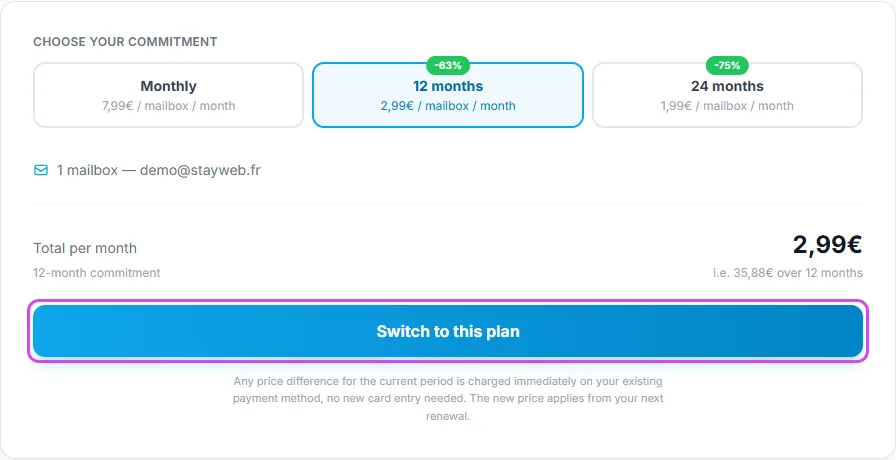
Already Pro: switch commitment with "Switch to this plan"
On the plan page of a Pro mailbox, select another commitment and click "Switch to this plan". Your subscription is updated in place: no new card entry, any price difference for the current period is charged right away and the new price applies from the next renewal.
Tap the screenshot to enlarge it. -
Cancel: "Cancel subscription"
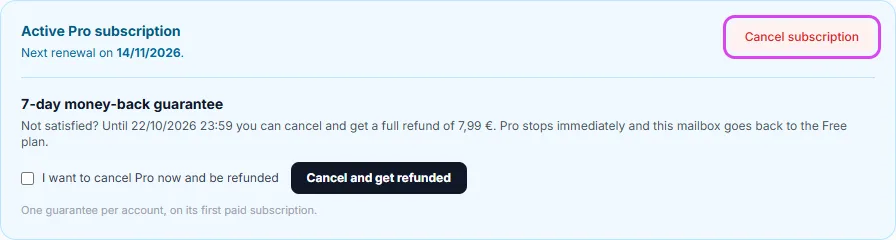
In the "Active Pro subscription" box at the top of the page, click "Cancel subscription". You keep Pro until the date shown, then the mailbox goes back to the free plan. A Reactivate button stays available until then.
Tap the screenshot to enlarge it. -
Within 7 days: "Cancel and get refunded"
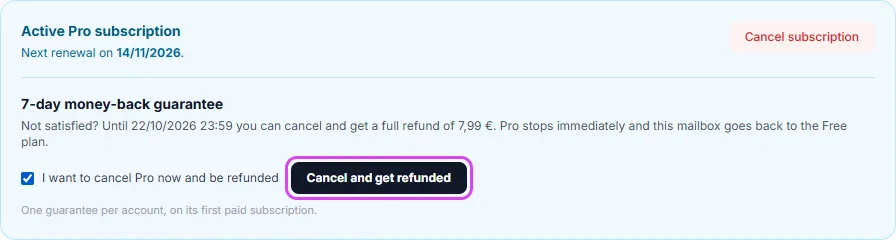
During the 7 days after the first payment of your account, the page shows the money-back guarantee. Tick "I want to cancel Pro now and be refunded", then click "Cancel and get refunded": the full amount goes back to your card and the mailbox returns to Free immediately.
One guarantee per account, on its first paid subscription only, and not if the mailbox already sent more than 20 emails. If the box is not shown, the guarantee no longer applies: you can still cancel at the end of the paid period.
Tap the screenshot to enlarge it.
If it does not work
The Subscribe button is missing
Your email address is not verified yet. Click "Resend email" in the yellow banner at the top of the dashboard, then click the link you receive.
Can I move my Pro to another mailbox?
No, Pro is tied to the mailbox it was bought for. Within 7 days you can get refunded and subscribe the right mailbox; otherwise cancel at the end of the period and subscribe the other mailbox.
I need more than 500 calls per day
Pro mailboxes can move to 1,000, 1,500, 3,000 or 6,000 calls per day. Use the "Contact us to change the quota" link on the plan page: support switches your subscription within minutes.
Where are my invoices?
Click "View my invoices" at the bottom of the plan page, or open Profile, Billing tab. Invoices are issued by Polar with the company details entered at checkout.
Other illustrated guides
Still stuck? A real person answers.
Tell us what you see on screen and we will look at your case — support is handled by the people who build MailMCP.
Contact support