Connect iCloud Mail to Claude or ChatGPT (MCP)
Short answer: Claude and ChatGPT have no iCloud Mail connector, but iCloud speaks IMAP/SMTP. Create an app-specific password on account.apple.com (your Apple password will be refused), add your @icloud.com address to MailMCP, which fills in the iCloud servers by itself, then paste your MailMCP server URL into Claude or ChatGPT. About 5 minutes.
Why iCloud Mail needs an MCP bridge
iCloud Mail works with every Apple device, but not with AI assistants: Claude and ChatGPT can only plug natively into Gmail and Microsoft accounts. MailMCP connects to iCloud over IMAP/SMTP, like the Mail app on a PC would, and turns your mailbox into an MCP server.
Without MailMCP
- No iCloud Mail connector in Claude or ChatGPT
- No MCP server published by Apple
- Copy-pasting emails into the AI by hand
With MailMCP
- iCloud detected from your address: no server to type
- Emails sent from your @icloud.com address, through the iCloud SMTP server
- Works with Claude, ChatGPT, Cursor, n8n, Make and any MCP client
iCloud Mail IMAP/SMTP settings
For reference: MailMCP fills them in by itself for @icloud.com, @me.com and @mac.com addresses, and for iCloud+ custom domains.
IMAP — Incoming mail
- Server
- imap.mail.me.com
- Port
- 993
- Security
- SSL/TLS
- Username
- your full iCloud address
SMTP — Outgoing mail
- Server
- smtp.mail.me.com
- Port
- 587
- Security
- STARTTLS
- Password
- app-specific password
Sources: Apple Support (« iCloud Mail server settings for other email client apps », « Sign in to apps with your Apple Account using app-specific passwords », « Mailbox size and message sending limits in iCloud »), checked on October 18, 2026.
Connect iCloud Mail in 3 steps
About 5 minutes, app-specific password included.
Create an Apple app-specific password
- Sign in on account.apple.com with your Apple Account.
- Under « Sign-In and Security », choose « App-Specific Passwords ».
- Click « Generate an app-specific password », name it MailMCP, and copy the password Apple shows (four groups of four letters).
Two-factor authentication must be on for your Apple Account; it is on for most accounts already. Apple shows the password only once: paste it into MailMCP right away.
Add your iCloud address in MailMCP
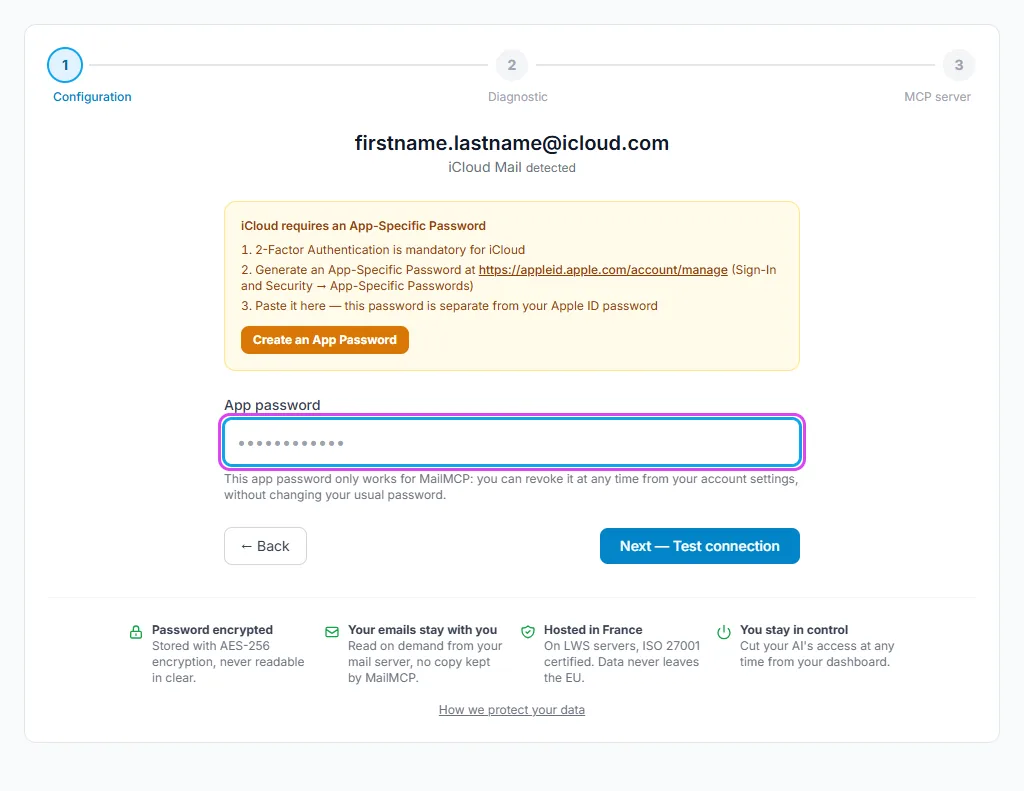
Sign up for free, no credit card. In the dashboard, click « Add a mailbox », type your address, for example firstname.lastname@icloud.com, then « Continue ». MailMCP shows « iCloud Mail detected », fills in the iCloud servers itself and only asks for the app-specific password. Paste it and click « Next — Test connection ».
Connect Claude or ChatGPT
Once the test passes, MailMCP shows the MCP server URL of this mailbox. Add it as a custom connector in Claude, or as an app in ChatGPT developer mode, and sign in to MailMCP when asked.
Your MCP server URL:
https://mailmcp.io/mcp/mcp_xxxxxxxx
Illustrated guide: connect Claude · Illustrated guide: connect ChatGPT
iCloud pitfalls and how to fix them
« It looks like you're using your regular password »
iCloud refuses the Apple Account password over IMAP and SMTP. MailMCP detects the error and links to account.apple.com: create an app-specific password and paste it instead.
The mailbox worked, then stopped after a password change
Changing or resetting your Apple Account password revokes all your app-specific passwords. Generate a new one and update it in MailMCP on the mailbox page (Connection tab). Apple allows up to 25 active app-specific passwords.
iCloud sending limits
Apple caps iCloud Mail at 1,000 messages and 1,000 recipients a day, 500 recipients per message, and 20 MB per message. MailMCP accepts up to 25 MB per email, but iCloud will refuse anything above 20 MB: keep attachments under that. iCloud is meant for personal use; bulk mailing is not allowed.
@me.com, @mac.com and custom domains
Older @me.com and @mac.com addresses are the same iCloud mailbox and are detected the same way. A custom domain served by iCloud+ is recognised from its mail servers; the password is always an app-specific password of the Apple Account.
What your AI can do with iCloud Mail
16 email tools: your emails are read on demand on the iCloud servers, never stored by MailMCP.
Read, search, sort
Summaries of unread emails, search by sender or subject, folders, flags, read or unread.
Send with attachments
Replies and new emails sent from your iCloud address, with attachments (link, upload or inline image; 10 MB per file).
Schedule
Emails scheduled for later, listed and cancelled on request. Every action is kept in the MCP log for 30 days.
Example requests
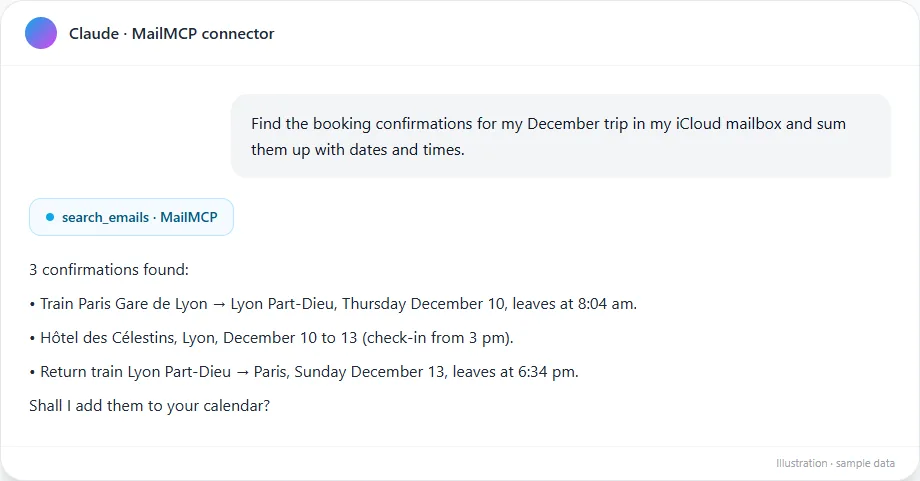
- « Find the booking confirmations for my trip in December in my iCloud mailbox and sum them up with dates and times. »
- « Reply to the school's email to confirm Thursday and send it tomorrow at 8 am. »
Pro plan: your iCloud calendars can be connected too (CalDAV), so the AI can check your free slots and add events.
MailMCP vs the native email connectors
| MailMCP | Claude connectors (Gmail, Microsoft 365) | ChatGPT connectors (Gmail, Outlook) | |
|---|---|---|---|
| iCloud Mail | Yes | No | No |
| Attachments in sent emails | Yes | No | No |
| Scheduled sending | Yes | No | No |
| Log of every action | Yes, 30 days | No | No |
The native connectors do read and send email, but only for Gmail and Microsoft accounts. Detailed comparison with the Gmail connectors
Sources: Claude help center, OpenAI release notes (June 8, 2026), MailMCP tests (October 2026).
Frequently asked questions
What are the IMAP and SMTP settings for iCloud Mail?
Why does iCloud refuse my usual Apple password?
My iCloud connection stopped working. Why?
Does it work with an iCloud+ custom email domain?
Why can't I connect iCloud Mail to Claude or ChatGPT without MailMCP?
Is it free?
Give your iCloud mailbox an AI assistant
Free account, hosted in France. Your iCloud Mail in Claude, ChatGPT or Cursor in a few minutes.