Connect your o2switch mailbox to Claude or ChatGPT (MCP)
Short answer: o2switch has no AI connector and no MCP server of its own, but every o2switch mailbox speaks standard IMAP/SMTP. Add it to MailMCP with your server name (xxxx.o2switch.net), IMAP 993 and SMTP 465 in SSL, then paste your MailMCP server URL into Claude or ChatGPT. It takes about 5 minutes.
Why an o2switch mailbox needs an MCP bridge
o2switch hosts the email of many French freelancers, small businesses and associations on its cPanel servers. Claude and ChatGPT can only plug natively into Gmail and Microsoft accounts: an address on your own domain hosted at o2switch stays out of reach. MailMCP connects to it over IMAP/SMTP, like a mail app would, and turns it into an MCP server.
Without MailMCP
- No o2switch connector in Claude or ChatGPT
- No MCP server published by o2switch
- Copy-pasting emails into the AI by hand
With MailMCP
- Your o2switch mailbox becomes an MCP server with its own URL
- Emails sent from your own address, through the o2switch SMTP server
- Works with Claude, ChatGPT, Cursor, n8n, Make and any MCP client
o2switch IMAP/SMTP settings
Your server name depends on the o2switch server that hosts your plan: there is no single address for every customer. The ports and encryption are the same for everyone.
IMAP — Incoming mail
- Server
- xxxx.o2switch.net
- Port
- 993
- Security
- SSL/TLS
- Username
- your full email
SMTP — Outgoing mail
- Server
- xxxx.o2switch.net
- Port
- 465
- Security
- SSL/TLS
- Password
- the mailbox password
How to find your o2switch server name
- In the « Bienvenue chez o2switch » email you received when you signed up: the server name ends in .o2switch.net.
- In cPanel: open « Comptes de messagerie » (Email Accounts), then click « Connect Devices » on the line of your address (« Configurer le client de messagerie » on older cPanel versions). The page shows the server to use.
- Or look at the address of your cPanel: if you log in on xxxx.o2switch.net:2083, xxxx.o2switch.net is your server name.
o2switch advises against relying on the automatic setup scripts of that cPanel page: just copy the server name and use the ports above.
Sources: o2switch FAQ (« Créer et gérer des adresses emails », Thunderbird and Outlook setup guides, SPF/DKIM authentication), checked on October 18, 2026.
Connect your o2switch mailbox in 3 steps
About 5 minutes, server name included.
Create your MailMCP account and type your address
Sign up for free, no credit card. In the dashboard, click « Add a mailbox » and type your o2switch address, for example firstname@mydomain.fr, then « Continue ».
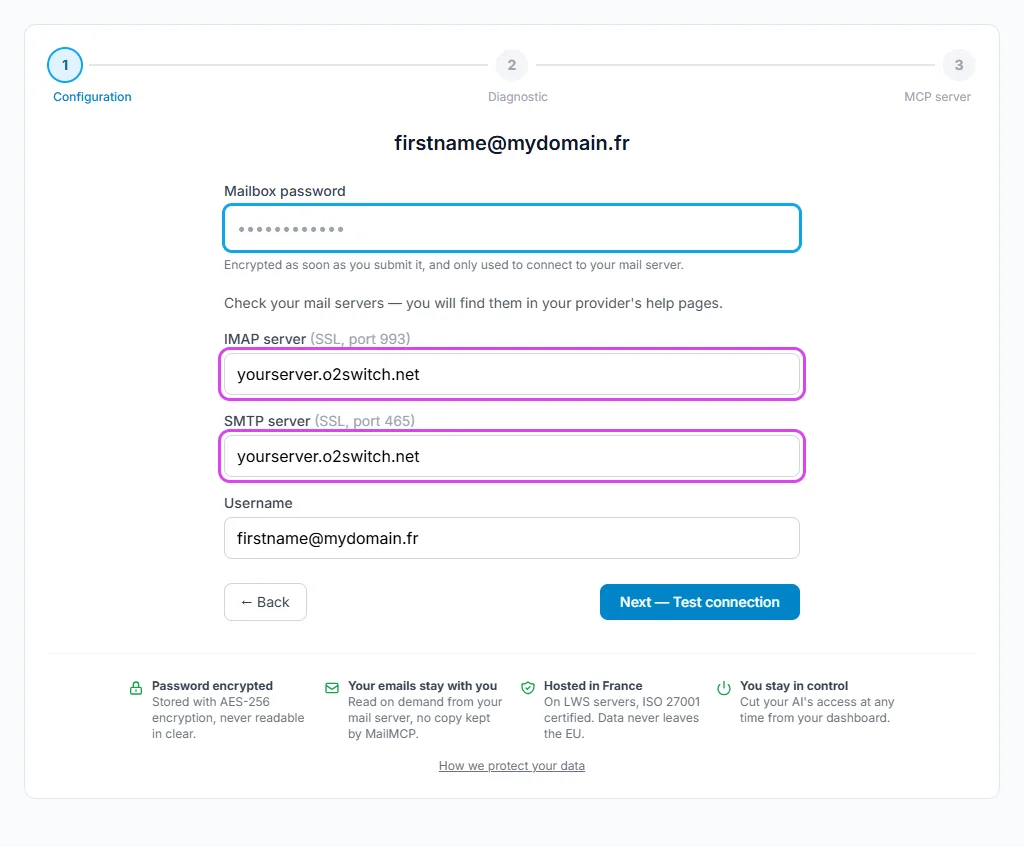
Enter the password and the o2switch server
Your address is on your own domain, so MailMCP cannot guess that it is hosted at o2switch: the wizard shows the server fields, pre-filled with mail.yourdomain. Replace both with your server name (xxxx.o2switch.net), enter the mailbox password and click « Next — Test connection ». MailMCP always connects in SSL on port 993 for IMAP; for SMTP it tries 465 in SSL, then 587 in STARTTLS if needed.
Connect Claude or ChatGPT
Once the test passes, MailMCP shows the MCP server URL of this mailbox. Add it as a custom connector in Claude, or as an app in ChatGPT developer mode, and sign in to MailMCP when asked.
Your MCP server URL:
https://mailmcp.io/mcp/mcp_xxxxxxxx
Illustrated guide: connect Claude · Illustrated guide: connect ChatGPT
o2switch pitfalls and how to fix them
« Authentication failed »: wrong password
MailMCP needs the password of the mailbox itself, not the one of your o2switch customer area or of cPanel. If you no longer have it, set a new one in cPanel, « Comptes de messagerie », « Gérer » on the address, then update it in MailMCP on the mailbox page (Connection tab).
Login or sending suspended on the address
cPanel can block receiving, sending or login for each address. If IMAP connects but sending fails, or nothing connects at all, check the restrictions of the address in « Comptes de messagerie », « Gérer ».
Too many failed attempts
After several wrong passwords in a row, the server may refuse logins for a while. MailMCP then shows « Too many failed attempts »: wait 15 to 30 minutes, check the password, and test again once.
Emails sent by the AI land in spam
o2switch sends outgoing mail through a dedicated relay that scores every message for spam. SPF (include:spf.jabatus.fr) and DKIM are on by default in cPanel, « Authentification », when your DNS is at o2switch; if your DNS is managed elsewhere, add them there. The MailMCP diagnostic checks your domain's SPF, DKIM and DMARC when you add the mailbox.
Mailbox full
Each o2switch address has the storage quota set in cPanel, and a full mailbox refuses new messages. Raise the quota in cPanel, or ask your AI to clean up: « Move the newsletters older than 6 months to the trash ».
What your AI can do with your o2switch mailbox
16 email tools: your emails are read on demand on the o2switch server, never stored by MailMCP.
Read, search, sort
Summaries of unread emails, search by sender or subject, folders, flags, read or unread.
Send with attachments
Replies and new emails sent from your address, with attachments (link, upload or inline image; 10 MB per file, 25 MB per email).
Schedule
Emails scheduled for later, listed and cancelled on request. Every action is kept in the MCP log for 30 days.
Example requests
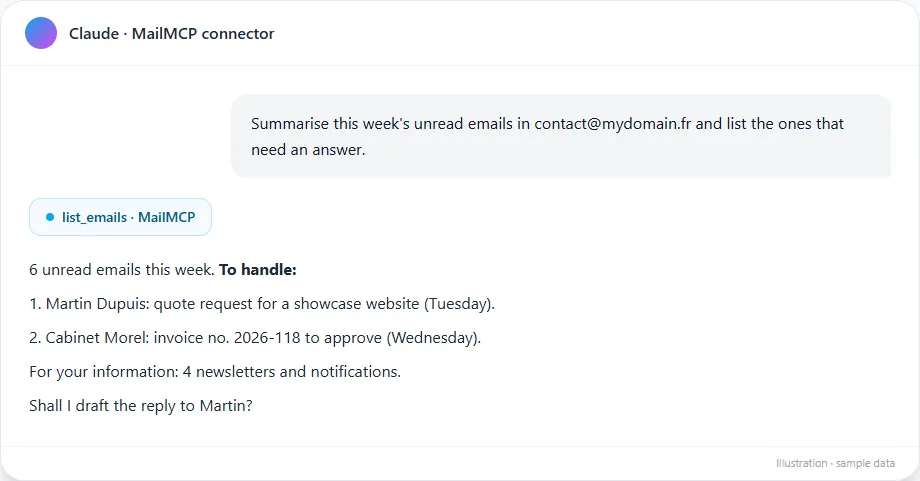
- « Summarise this week's unread emails in contact@mydomain.fr and list the ones that need a reply. »
- « Reply to Martin's quote request, attach the PDF from this link and send it tomorrow at 8 am. »
MailMCP vs the native email connectors
| MailMCP | Claude connectors (Gmail, Microsoft 365) | ChatGPT connectors (Gmail, Outlook) | |
|---|---|---|---|
| o2switch mailbox | Yes | No | No |
| Attachments in sent emails | Yes | No | No |
| Scheduled sending | Yes | No | No |
| Log of every action | Yes, 30 days | No | No |
The native connectors do read and send email, but only for Gmail and Microsoft accounts. Detailed comparison with the Gmail connectors
Sources: Claude help center, OpenAI release notes (June 8, 2026), MailMCP tests (October 2026).
Frequently asked questions
What are the IMAP and SMTP settings for an o2switch mailbox?
Where do I find my o2switch server name?
Can I use mail.mydomain.fr instead of the o2switch server name?
Do I need an app password for o2switch?
Why can't I connect o2switch to Claude or ChatGPT without MailMCP?
Is it free?
Give your o2switch mailbox an AI assistant
Free account, hosted in France. Your o2switch mailbox in Claude, ChatGPT or Cursor in a few minutes.